all saved colors disappeared from my color palette

Viewing 2 posts - 1 through 2 (of 2 total)
  • Author
    Posts
  • #49453
    Marty van Beek
    Participant

    Good morning fellow users

    I just started ES, and suddenly all my saved colors have disappeared from the color palette
    I must have accidentally clicked a feature on or off, but I have no idea which one
    Does anyone know how to get those colors back, or do I just have to start over with applying colors?

    Thanks in advance

    #50883

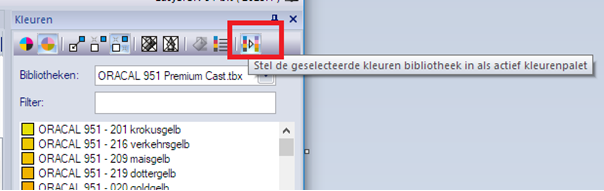
    To add a color library, follow the steps below.

    1. Select the desired library in the color window.
    2. Now use the button on the far right of the toolbar of this color window.
    3. The color bar at the bottom will now display the colors from this chosen library.


Viewing 2 posts - 1 through 2 (of 2 total)
  • You must be logged in to reply to this topic.