
Tagged: sccm silent install
- This topic has 7 replies, 7 voices, and was last updated 1 year, 10 months ago by
 Paul Schoofs.

- AuthorPosts
- 13 January 2020 at 11:53 #10176
 EasySIGNParticipant
Installation and activation of EasySIGN
1.) License and software
First off all, get your license. The EasySIGN subscription is best suitable for most users.
Once your subscription is active, download the latest version of EasySIGN.
2.) Installation of EasySIGN
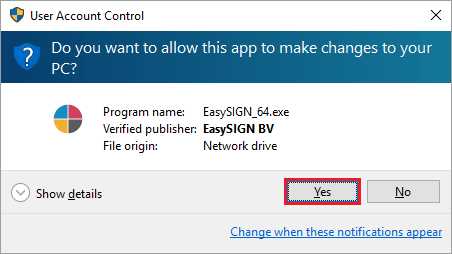

Double-click EasySIGN_64.exe when downloaded to install EasySIGN on your PC
If you have Windows User Account Control enabled, confirm by pressing Yes when asked to allow system changes during the installation process. This is required to run the software properly.
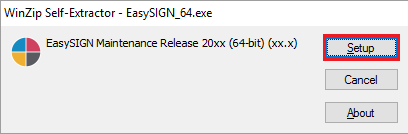 Click Setup to begin the installation process, then wait until the self-extractor has finished. This may take several minutes, depending on your computer’s performance. If the message “Not Responding” appears, please ignore it and continue to wait until the installation proceeds.
Now follow the on-screen instructions to install the software according to your preferences.
Start EasySIGN when the installation is completed.
3.) Activate EasySIGN
Sign in to EasySIGN to activate your EasySIGN license.
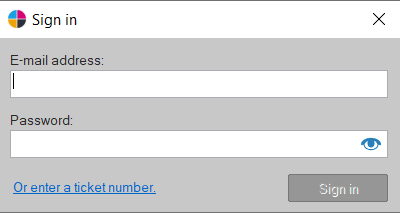
Read more about activating EasySIGN.
- This topic was modified 6 years, 8 months ago by Paul Schoofs.
- This topic was modified 6 years, 8 months ago by EasySIGN.
- This topic was modified 6 years, 8 months ago by EasySIGN.
- This topic was modified 6 years, 8 months ago by EasySIGN.
- This topic was modified 6 years, 8 months ago by EasySIGN.
- This topic was modified 6 years, 8 months ago by EasySIGN.
- This topic was modified 6 years, 8 months ago by EasySIGN.
- This topic was modified 6 years, 8 months ago by EasySIGN.
- This topic was modified 6 years, 8 months ago by EasySIGN.
- This topic was modified 6 years, 8 months ago by EasySIGN.
- This topic was modified 6 years, 8 months ago by EasySIGN.
- This topic was modified 6 years, 8 months ago by Paul Schoofs.
- This topic was modified 6 years, 8 months ago by Paul Schoofs.
- This topic was modified 6 years, 8 months ago by Paul Schoofs.
- This topic was modified 6 years, 8 months ago by Paul Schoofs.
- This topic was modified 6 years, 8 months ago by Paul Schoofs.
- This topic was modified 6 years, 8 months ago by Paul Schoofs.
- This topic was modified 6 years, 8 months ago by Paul Schoofs.
- This topic was modified 6 years, 8 months ago by Paul Schoofs.
- This topic was modified 6 years, 8 months ago by Paul Schoofs.
- This topic was modified 6 years, 7 months ago by EasySIGN.
- This topic was modified 5 years, 2 months ago by Paul Schoofs.
- This topic was modified 5 years, 2 months ago by Paul Schoofs.
- This topic was modified 1 month, 2 weeks ago by Paul Schoofs.
9 March 2020 at 14:41 #11882Dragos NechiforParticipant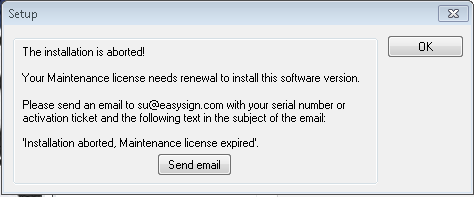
I just paid for a new licence on 6th of March. I have not received any installation key or ticket.
I followed your guide and I received this error message.
Please let me know what should i do
26 March 2020 at 17:33 #12226EasySIGNModeratorIf you get the error message “Installation aborted, Maintenance license expired”, it’s best to contact us by mail. We’ll look into the underlying problem and provide you with a custom solution 🙂
22 May 2020 at 09:06 #13393Carlos GarciaParticipantHi, I’d like to know if Easysign allows installation on two computers simultaneously.
If not, I’d like to know if I can install the program on one computer and then transfer it to another. How would I do that?
25 May 2020 at 14:54 #13443EasySIGNParticipantHi Carlos,
EasySIGN offers a logon license. Therefore you can install the EasySIGN software on two computers. You will open the EasySIGN software when you logon with your account. When you have a single EasySIGN license you can logon on one PC. When you logout you will be able to logon to EasySIGN on another PC.
In case you want to work with EasySIGN on two computers simultaneously, two EasySIGN licenses will be required.Have an easy day!
Wilbert at EasySIGN
18 January 2021 at 15:13 #19895Peter op t VeldParticipantI have to deploy the EasySign software with Microsoft MDT/SCCM to multiple workstations within our School.
Can anyone provide me the parameters or other informatie to create an MDT/SCCM package from EasySign?Thank you in advanced.
8 October 2021 at 12:55 #24278Gomarus scholengemeenschapParticipantDoes EasySIGN also have an option for Silent Setup? I can’t find anything about this in the documentation. Actually, it’s the same question as Peter op t Veld. Pete, do you know by now if this is possible?
11 November 2024 at 13:01 #45066Paul SchoofsKeymasterThe EasySIGN installation can be performed in silent mode, meaning without going through dialogues.
If you rename the downloaded installation file easysign_XXXX.exe to .zip and open it in Explorer, you will find the folder named NoWizard there. In that folder, you will find a document with the most up-to-date explanation.
- This topic was modified 6 years, 8 months ago by
- AuthorPosts


- You must be logged in to reply to this topic.